
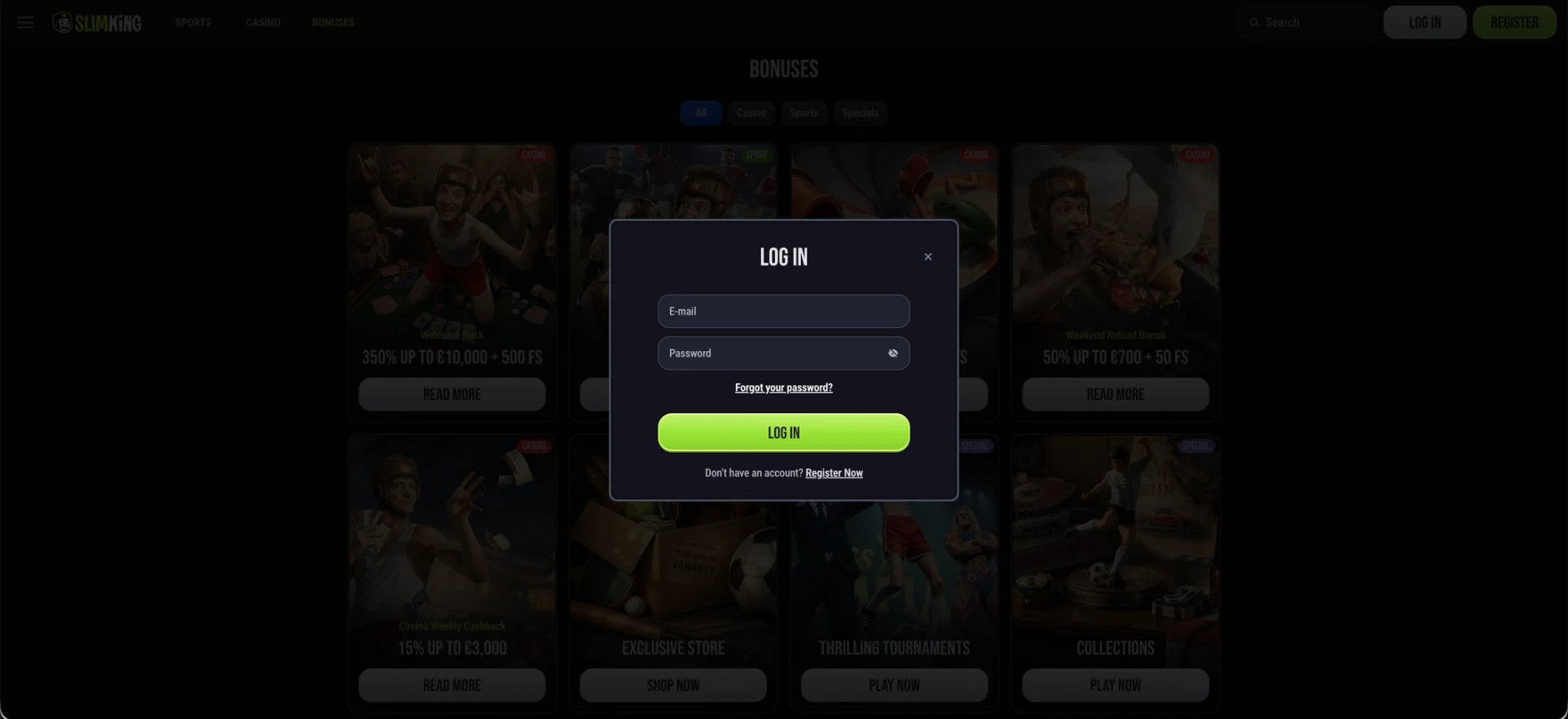
The Slimking login button sits in the top-right corner of every page, next to REGISTER. Clicking LOG IN opens a pop-up form where players enter the email address and password used at registration, then confirm with the green LOG IN button. The same form works on desktop and in mobile browsers. If sign-in fails, the "Forgot your password?" link under the password field starts a reset by email, and 24/7 live chat helps with blocked or locked accounts.
The login form is kept deliberately short: no username, no phone number and no security questions. That makes the email address and password the only keys to the account, so a strong, unique password and a secure email inbox matter more here than on sites with extra login steps. Slimking is not licensed by the UK Gambling Commission, so account security and any dispute rely entirely on the operator's own procedures.
| Login essentials | Details |
|---|---|
| Where to log in | LOG IN button, top-right corner of every page |
| Login method | Email address + password |
| Show password | Eye icon inside the password field |
| Password reset | "Forgot your password?" link in the login form |
| No account yet | "Register Now" link at the bottom of the form |
| Device support | Desktop and mobile browsers, no download |
| When verification appears | Before the first withdrawal, or on a security review |
| Currency | Set at registration; promotions advertised in EUR |
| Support | 24/7 live chat |
How to log in to Slimking
Signing in to Slimking takes a few seconds and does not depend on which section of the site is open. The LOG IN button stays in the header on the homepage, in the Casino lobby, in the Sports section and on the Bonuses page, so there is no need to return to the homepage first.
Step-by-step Slimking login
The process is identical on a computer and in a mobile browser, and the pop-up form keeps the current page loaded in the background.
- Open the Slimking website in a current browser.
- Click LOG IN in the top-right corner.
- Enter the email address used when the account was created.
- Type the password; tap the eye icon to check it for typos.
- Click the green LOG IN button.
- Wait for the header to change to the balance and account menu.
Create an account if there is no profile yet
The login form cannot create an account. Players without a profile can click "Register Now" at the bottom of the login pop-up, which switches straight to the two-step registration form without closing the window.
Quick registration flow
The first registration screen asks for a bonus choice, email, password, country and currency, plus confirmation of age and the Terms & Conditions. After NEXT STEP, a second screen completes the profile. The email and password set here become the Slimking login details, so it is worth using an address that will remain accessible long term.
Secure login practices
Because the login relies on email and password alone, a few simple habits protect the account and the balance.
- Use a password that is not used on any other site, ideally from a password manager.
- Protect the email inbox linked to the account with its own strong password and two-step verification.
- Avoid logging in on shared or public computers; if unavoidable, log out and clear the browser afterwards.
- Do not save the password in a browser on a device used by other people.
- Contact live chat straight away if a login notification or balance change looks unfamiliar.
Slimking password recovery
A forgotten password is the most common reason for a failed Slimking login, and the reset is handled from the same pop-up. The reset link is sent to the registered email, so access to that inbox is required.
Reset steps
The reset takes a couple of minutes, depending on how quickly the email arrives.
- Click LOG IN in the top-right corner.
- Click Forgot your password? under the password field.
- Enter the email address linked to the account and submit.
- Open the reset email; check the spam or promotions folder if it is not in the inbox.
- Follow the link and set a new password.
- Return to the site and log in with the new password.
Slimking mobile login
There is no separate app login. On a phone, the site opens in the browser with the same LOG IN button in the header, and the form behaves exactly as it does on desktop. Balance, bonuses, challenge progress and open bets are shared across devices.
Tips for mobile
A few small adjustments make signing in on a phone smoother.
- Add the site to the home screen from Safari's Share menu or Chrome's menu for one-tap access.
- Allow the browser's password manager to fill the credentials on a personal device.
- Turn off aggressive content blockers if the pop-up form does not open.
- Switch from Wi-Fi to mobile data, or the reverse, if the form hangs after submitting.
Troubleshooting common Slimking login errors
Most login problems fall into four groups. Working through the matching fix usually restores access without contacting support.
Incorrect credentials
An error after submitting the form usually means a typo in the email or password. The password is case-sensitive, so Caps Lock is a frequent cause. Using the eye icon to show the password, checking that the email is the one used at registration and, if needed, resetting the password solves the issue in most cases.
Browser or cache issues
If the form does not open, does not respond or the session drops straight after login, stored browser data or an extension is the usual cause.
- Clear cache and cookies for the site, then reload the page.
- Disable extensions that block scripts or pop-ups.
- Try another current browser such as Chrome, Safari, Firefox or Edge.
- Check the device's date and time are set automatically.
Reset email does not arrive
When the password reset email is missing, the spam folder is the first place to check. If nothing arrives within several minutes, the email address entered may differ from the one on the account; live chat can confirm which address is registered after basic identity checks.
Account blocked or restricted
Accounts may be restricted after repeated failed attempts, during a security review, while verification documents are pending, or when duplicate accounts are detected. In these cases the form will not let the player in even with the correct password, and only the support team can lift the restriction. Live chat explains the reason and lists any documents required.
What is available after Slimking login
Once signed in, the header shows the balance and the account menu, and every section of the site becomes fully interactive.
- Cashier: deposit and withdrawal methods available for the account's country.
- Casino: more than 7,300 games, including Top, Hot, Exclusive and Epic Jackpots collections.
- Sports: pre-match and live betting with the betslip and Popular Bets panel.
- Bonuses: active offers, reloads and weekly cashback.
- Store: coin balance and rewards such as free spins, bonus money and free bets.
- Challenges and Collections: weekly task progress and card sets.
- VIP: current level and benefits.
Account verification (KYC)
Verification is not part of the login process, but it often appears soon after. Withdrawals are paid only after an account passes verification and security reviews, so the first cash-out request usually triggers a document check. The casino may also request documents at any time during a security review.
Typical documents include a passport or driving licence, a proof of address dated within the last three months, and proof of ownership of the payment method used. Uploading them before the first withdrawal avoids the most common delay.
Slimking login FAQ
Short answers to the questions players ask most often about signing in.
Where is the Slimking login button?
The LOG IN button is in the top-right corner of every page, next to the REGISTER button.
Can Slimking login use a username?
No. The login form accepts the registered email address and password only.
How can a Slimking password be reset?
Click LOG IN, then "Forgot your password?", enter the account email and follow the link in the reset email.
Does Slimking login work on mobile?
Yes. The same pop-up form works in mobile browsers on iOS and Android, with no app required.
Why can the correct password still fail?
The account may be restricted for a security review, pending verification or repeated failed attempts. Live chat can confirm the reason.
Is Slimking regulated in the UK?
No. Slimking does not hold a UK Gambling Commission licence, so account issues are resolved only through the operator's own support.